Traffic
Active health checks
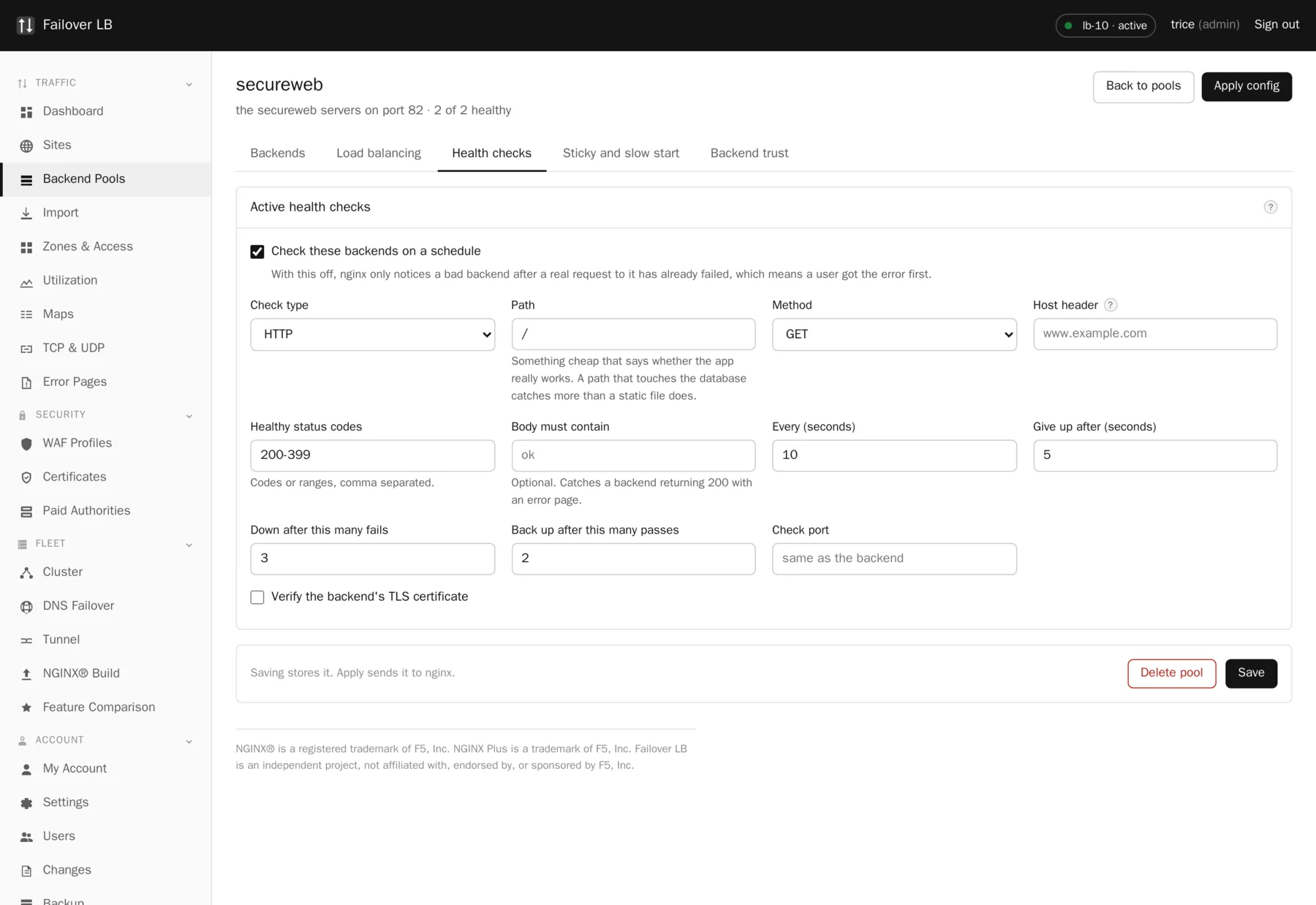
Free nginx only notices a dead backend after a real request to it has already failed, which means a visitor got the error first. This checks every backend on a timer, from every node, whether or not anybody is browsing the site.
Passive checks are not enough
Free nginx gives you max_fails and fail_timeout. Those are passive
checks: nginx notices a backend is bad because a real request to it failed. Somebody had to get
an error first, and if that backend is one of three, roughly a third of your visitors get it.
Active checks fix the ordering. The manager probes each backend on a schedule of your choosing.
When one fails enough times in a row it gets written into the upstream with down on
it and nginx reloads. When it comes back and passes enough times, the down comes
off. Your visitors are never the test.
What you can set
| Setting | What it does | Usual value |
|---|---|---|
| Check type | Open a connection, or ask for a page and read the answer. | Ask for a page |
| Path | Which page to ask for. | A health endpoint |
| Method | GET or HEAD. | GET |
| Interval | How often to check. | 5 to 10 seconds |
| Timeout | How long to wait for an answer. | 2 to 5 seconds |
| Rise | How many good checks before it is used again. | 2 |
| Fall | How many bad checks before it is taken out. | 3 |
| Healthy status codes | What counts as a good answer. | 200-399 |
| Body must contain | Words that have to appear in the answer. | Optional |
| Host header | The name to ask for, when the server hosts several. | Your site name |
| Check port | Check a different port from the one traffic uses. | Same as the backend |
Check something that can actually fail
This is the part people get wrong
A check that asks for the front page tells you the web server is running, which you already knew. A check that asks for a page which talks to the database tells you the application works. The difference only shows up during an outage, which is exactly when the first kind reports everything healthy while every visitor gets an error.
The body must contain field is the cheap insurance. Plenty of applications answer 200 while rendering an error page. Requiring a short string that only appears when things are genuinely working catches that.
Every node checks separately
This is one thing the free version does that the paid nginx does not. Each node runs its own checks and the answers are kept apart. A backend that node A can reach and node B cannot is a routing or firewall problem, and seeing it split out that way usually tells you the answer straight away instead of after an hour of guessing.
About the reloads
Marking a backend down is a config rewrite and a reload. An nginx reload is graceful: the master starts new workers with the new config, hands them the new connections, and lets the old workers finish what they were doing before they stop. Nobody is disconnected and no request is dropped.
Reloads are debounced, so twenty backends flapping at once turns into one reload rather than twenty. If a backend is flapping often enough for that to matter, the reload rate is not really your problem: work out why the backend keeps failing.
Checks over the tunnel
A backend reached through the tunnel is checked exactly like any other. If the tunnel goes down the checks fail, the backend is marked down, and the site keeps serving from whatever else is in the pool. Nothing special has to be configured for that.
Common questions
What interval should I use?
Between five and ten seconds suits nearly everybody. Lower notices a failure sooner and asks your servers more often. If your backends are expensive to ask, use a cheap health endpoint rather than a longer interval.
Will health checks show up in my application logs?
Yes, one line per check per node. Point them at a path you can filter out, or at a route that logs at a lower level.
Do checks send the backend trust token?
Yes. Without that, the moment a backend started enforcing the token every check would come back 403 and a perfectly healthy pool would be marked down and pulled out of service.
What happens if every backend in a pool fails?
The site serves an error. You get a warning before applying a config that would leave a pool with no healthy members, but it is a warning and not a refusal, because sometimes that is exactly what you meant.
Step by step instructions
The how to section has searchable, task shaped answers. Search it for health check.
Related features
Backend pools
The list of servers behind a site, and how traffic is shared.
Read moreSlow start
Ease traffic onto a server that just came back.
Read moreAdaptive weighting
Give the faster backends more of the work.
Read moreUtilization charts
Requests, connections, processor and memory over time.
Read more