Traffic
Backend pools
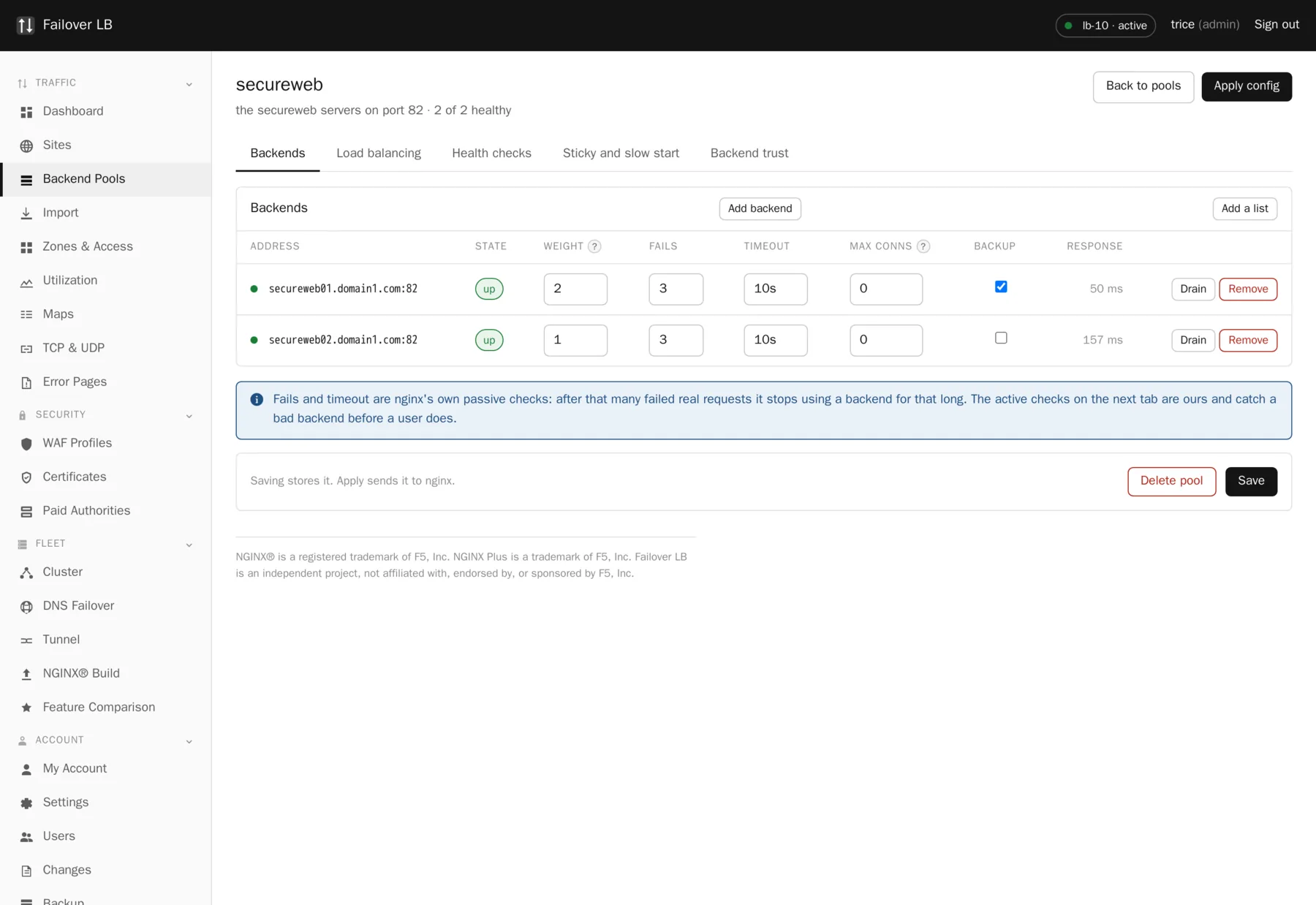
A pool is the list of servers that actually run your application. The load balancer takes a request and hands it to one of them. If a pool has four servers and one stops answering, the other three carry on and nobody outside notices.
Why pools are separate from sites
Because more than one site usually wants the same servers, and because you will want to move a site to a different pool one day without editing the site itself. Keeping them apart also means the health checker has one clear thing to watch.
What each row holds
| Setting | What it does | Usual value |
|---|---|---|
| Address and port | Where the server is. An address or a name. | 10.0.0.11 : 8080 |
| Weight | Its share compared to the others. A 2 gets twice as much as a 1. | 1 |
| Backup | Only used when every non backup server is down. | Off |
| Max fails | Failures in a row before nginx itself takes it out. | 3 |
| Fail timeout | How long it stays out before being tried again. | 10s |
| Max connections | A cap on how many at once this server will be given. 0 means no cap. | 0 |
| State | Up, down, or draining. | Up |
Draining is the one to remember
Turning a server off outright drops whatever it was in the middle of. Draining lets it finish what it has and take nothing new, so you watch the connection count fall to zero and only then touch the machine. It is the difference between a clean retirement and a handful of angry support tickets.
A word about backup servers
A backup server sounds useful and is usually a mistake. It sits idle and untested until every other server in the pool is down, which is the worst possible moment to find out it does not work any more. It is genuinely good for one thing: serving a holding page that says the site is having a problem.
Connection reuse
Keep alive holds connections open ready for the next request instead of making a new one every time. It makes a real difference to speed and the default is sensible. The number is how many idle connections to hold per server, not a limit on traffic.
Servers that speak https
If your application listens on https rather than plain http, turn on TLS for the pool. Two further settings matter and they are covered on the backend TLS page. The short version: leave certificate checking on, and if your company issues its own certificates, point the pool at your authority file rather than switching the check off.
When the application is not at the root
Most backends serve the application from the top, so a request for /basket arrives
as /basket and everybody is happy. Some do not. A packaged application, an
appliance, or something deployed into a servlet container will often insist on living under a
prefix such as /shop/.
On the Load balancing tab there is a box called Where the application sits on these backends. Put the prefix there and the load balancer adds it to every request on the way in, and takes it back off the redirects on the way out, so it never shows up in a visitor's address bar.
It takes a path and nothing else: no scheme, no hostname and no port. This is saying where the application sits, not how to reach it, and how to reach it is already settled by the rows on the Backends tab.
The reason it belongs on the pool rather than on a site is that it is a fact about the servers. Every site pointed at that pool has to deal with it, so setting it once here means the next site somebody makes is right without them having to know. A site or a single path can still override it, which is what you want when the same backends are also reached some other way. There is a how to entry covering which of the three to reach for.
Deleting a pool
A pool being used by a site cannot be deleted, and the page says which site is using it. Point that site somewhere else first. This is deliberate, since deleting a pool a site depends on would take that site down at the next apply, and the delete and the outage would be far enough apart that nobody would connect them.
Common questions
How many servers can a pool have?
As many as you like. The practical limit is how many health checks you want to run and how often, which is a setting per pool.
Can one server be in more than one pool?
Yes. A machine running two applications on two ports is two rows in two pools, and that is the normal way to do it.
Do pools for TCP and UDP share the pools sites use?
No, and this is a rule in nginx rather than a choice made here. Stream pools and http pools are separate, so you will see the same machines listed twice.
My backend serves the app under /shop rather than at the root. Where does that go?
On the pool, Load balancing tab, in the box called Where the application sits on these backends. Put in the path only, with no scheme or hostname. The prefix is added to requests going in and taken off redirects coming back, so visitors never see it. A site or a path can override it when the same backends are reached more than one way.
Step by step instructions
The how to section has searchable, task shaped answers. Search it for pool.
Related features
Active health checks
Probe every backend on a schedule and pull the dead ones out.
Read moreLoad balancing methods
Round robin, least connections, hashing and consistent hashing.
Read moreBackend TLS
Speak https to your own servers, and verify it properly.
Read moreSticky sessions
Send the same visitor back to the same backend.
Read more